
This blog was originally published on Medium by Joost Landgraf, CTO at CoolProfs
OutSystems accelerates development, but speed can sometimes mask architectural issues when applications evolve organically. One of the most common issues that appears in OutSystems logic flows — especially in larger apps — is the Call Chain Anti-Pattern.
This anti-pattern emerges when multiple client actions, server actions, or service actions call each other in long sequences, creating workflows that are hard to see, hard to maintain, and extremely fragile.
This article explains the anti-pattern specifically in the context of OutSystems, why it happens, how it impacts maintainability and performance, and how to fix it using a proper orchestration pattern.
When Outsystems is mentioned, it’s mainly about O11, but the same issues can happen in ODC, only on an Application level, because we do not have multiple modules in one application.
1. What is the Call Chain Anti-Pattern in OutSystems?
In OutSystems, the call chain anti-pattern happens when one action calls another, which calls another, and so on, often across multiple modules. For example:

Because OutSystems makes it easy to call actions from anywhere, developers often allow chains to grow naturally. Over time, logic becomes fragmented across modules with no single place to see the full flow.
Typical symptoms in OutSystems:
- Server actions calling other server actions in deep chains
- Client actions triggering multiple server-side flows indirectly
- Server actions calling service actions calling server actions calling service actions.
- Complex logic distributed across several modules
- Side-effects hidden behind actions that “just call another thing”
Ultimately, the workflow becomes implicit instead of explicit.
2. Why this anti-pattern emerges in OutSystems
OutSystems encourages reuse and modularity, but without structure, that same flexibility encourages hidden coupling. Here are the main reasons the call chain anti-pattern appears in OutSystems applications.
Reason 1: Fast, Iterative Development Without Architectural Boundaries
OutSystems teams deliver quickly. It’s natural to add one more call inside an existing action:
- “I’ll call this other module’s action — seems easier.”
- “We just need to call one more step afterward.”
These incremental steps accumulate over months and years, forming long invisible chains.
Reason 2: No Central “Workflow Owner”
OutSystems does not enforce a single location for process orchestration.
- Actions call other actions.
- Logic nodes do work and coordinate workflow.
- Modules do not have strict separation of concerns.
So each action becomes responsible for “calling the next thing,” scattering the workflow.
Reason 3: Misuse of Application / Integration Layers
Many OutSystems teams place logic in the wrong layer:
- Integration modules calling business modules
- Business modules calling UI modules
- Core modules calling domain modules indirectly
This leads to implicit workflows spanning layers, with no clear architecture.
3. Why the Call Chain Anti-Pattern Is Harmful in OutSystems
Even though everything might “work,” the system becomes significantly harder to maintain.
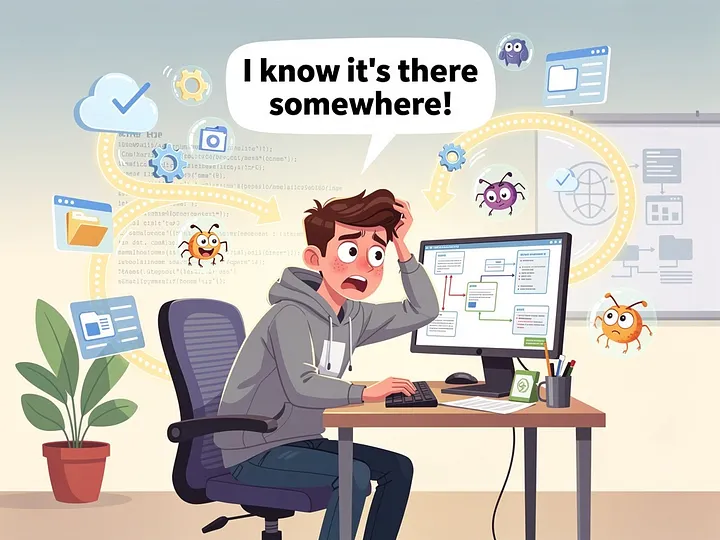
1. The Workflow Becomes Invisible
In Service Studio, you cannot see the entire workflow on a single action flow. Instead, you must jump between modules and drill into dozens of actions to understand what happens. You lose:
- Transparency
- Predictability
- Developer confidence
2. Testing Becomes Painful
Unit-level tests (“Action Tests” or BDDFramework tests) require extensive mocking because calling one action triggers an entire chain. It becomes impossible to test:
- Individual logic units
- Side-effect-free functions
- Reusable business rules
3. Changes Become Dangerous
Adding or removing a step may require changes across multiple modules.
In OutSystems this often results in:
- Broken references
- Outdated/Incompatible consumers
- Outdated producers
- Unexpected logic execution in unrelated modules
- Increased Deployments
This slows down delivery and increases the risk of regressions.
4. Error Handling Is Scattered
Because the workflow is distributed across modules, each action handles errors differently:
- Some actions use exception handlers
- Some rely on Return Codes
- Some rely on Boolean outputs
- Some don’t handle errors at all
You end up with inconsistent error behaviour and unpredictable failures.
5. Performance Impact
Because the chains are becoming larger, you have no overview how many aggregates, how many service actions etc are being called and especially if they are doing almost the same thing. Long chains increase:
- Application latency
- Database round trips
- CPU usage on the platform server
This is especially problematic in mobile apps where client/server action chains are expensive.
4. A Visual Summary of the Problem
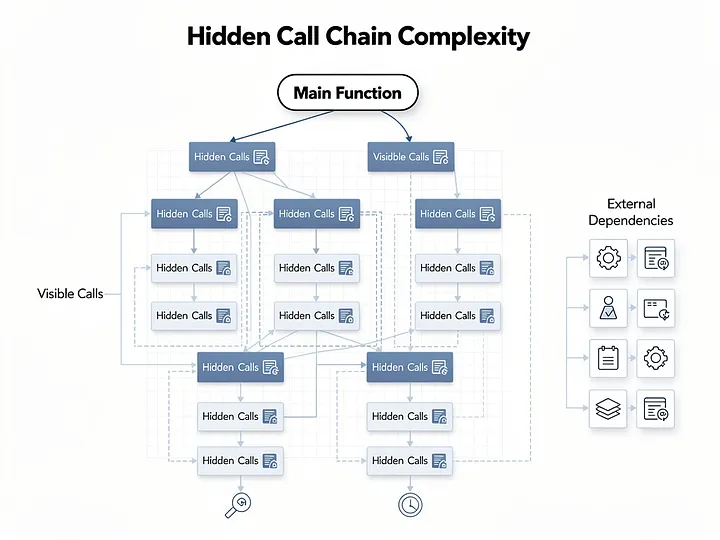
This is what the system becomes: A web of invisible dependencies between modules and actions, impossible to visualize in Service Studio and extremely fragile over time.
5. The Solution: Orchestration Pattern (The OutSystems Version)
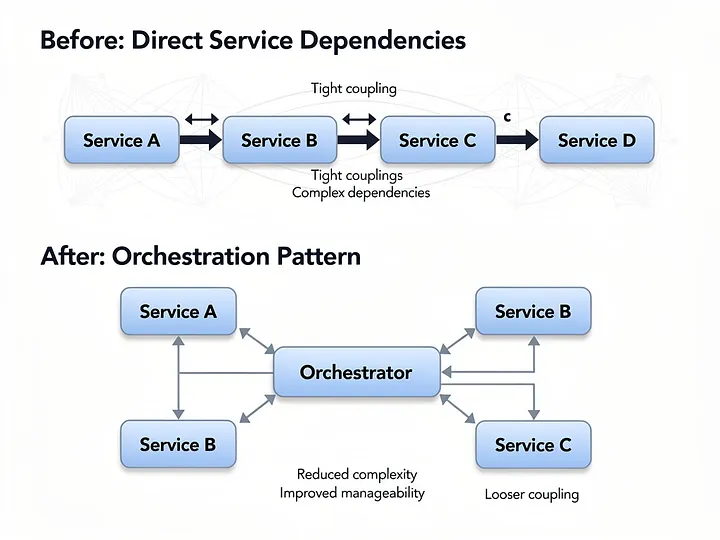
Instead of letting actions call each other freely, move workflow responsibility into a single orchestrator action.
Before (Call Chain)
A calls B
B calls C
C calls D
After (Orchestration)
Orchestrator action:
Run A
Run B
Run C
Run D
In OutSystems, this orchestrator can be:
- A Server Action inside a business module
- A Business Process (when long-running)
- A Process Action
- A Client Action orchestrating server steps
- A Logic-orchestrating API endpoint
6. How Orchestration Improves OutSystems Architecture
✔ Centralized Workflow
One action shows the entire process.
Easy to read. Easy to maintain.
✔ Clear Responsibility Split
- Steps = do work
- Orchestrator = directs workflow
OutSystems encourages logic abstraction, so this aligns well with platform best practices.
✔ Better Testability
Each step becomes independently testable.
✔ Safer Refactoring
Changing sequence or adding steps happens in one place.
✔ Consistent Error Handling
The orchestrator defines:
- Retries
- Exception behaviour
- Logging
- Compensation logic
Conclusion
The Call Chain Anti-Pattern appears frequently in OutSystems applications because the platform makes it so easy to call actions across modules. But as chains grow, systems become hard to understand, maintain, and evolve.
The remedy is straightforward:
Use an explicit Orchestration Pattern.
Keep actions focused on work, and orchestrators focused on workflow.
This gives you systems that are more maintainable, testable, performant, and aligned with OutSystems architecture best practices.
But
It’s not always the solution. Always think before you code, think before you architecture your application. Use tools to visualize your architecture.
“The sooner you start coding, the later you finish.”