

Estimated reading time: 0 minutes
You can bring Claude and MCP into your OutSystems practice without giving up the thing low-code gave you: a visual model you can see, review and trust.
Most low-code teams I talk to feel the same pull in two directions. They see what AI agents can do, and they want the speed. But they also hear “AI writes the code” and picture a black box: thousands of lines nobody reviewed, architecture drifting, governance gone. For a team that chose OutSystems because of control and visibility, that sounds like a step back.
It doesn’t have to be. This post explains why, and how we approach the transition in practice.
Why the fear makes sense
The fear is rational, because low-code solved real problems that unguided AI coding brings back.
OutSystems gave us a lot more than speed:
- A visual model as the single source of truth. Screens, logic flows, entities and roles are things you can open and look at, not text you have to reverse-engineer.
- Guardrails built in. Validation catches broken references, type errors and impact across modules before anything is published.
- Governance by design. Environments, deployment pipelines, roles and dependency management are part of the platform, not an afterthought.
- Readability for the whole team. A business analyst or architect can follow a logic flow without reading C# or JavaScript.
Now picture an AI agent generating a traditional codebase. Every change is a diff of hundreds of lines. Architecture standards live in people’s heads. Reviews become skimming. That is the scenario teams are afraid of, and they are right to be.
The question is not whether to use AI. It is where the AI does its work.
The shift: AI edits the model, not a pile of code
With MCP, Claude doesn’t generate a separate codebase next to OutSystems. It works inside the OutSystems model, through the same platform that enforces your rules.
The Model Context Protocol (MCP) is an open standard that lets an AI assistant call tools in another system in a controlled way. When OutSystems exposes its capabilities through MCP, Claude can do things like:
- read the data model, screens and logic of an existing app;
- add an entity, an attribute, a server action or a screen;
- run validation and read back the errors and warnings;
- ask Mentor to build or review a piece of functionality;
- publish, but only when you let it.
The result of every change is an ordinary OutSystems element. You open Service Studio or ODC Studio and you see exactly what was built: the entity in the data model, the flow on the canvas, the widget on the screen. Nothing is hidden in generated files.
That is the key insight: the visual model stays the source of truth. Claude becomes another developer on the team, one who works very fast, but who works in your model, under your rules, and whose work you review the same way you review a colleague’s.
Claude works in your model, you hold the gates
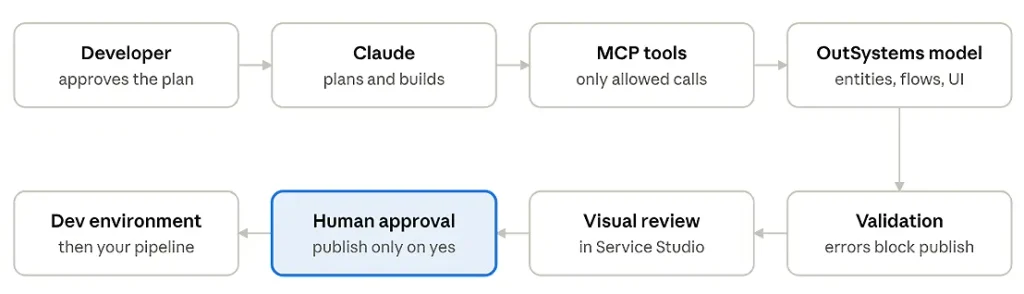
Claude + MCP on OutSystems · 8 steps, 3 gates
Claude only reaches the model through the MCP tools you allow; validation, your visual review and your approval all sit between its work and any environment.
Five layers of control you keep
Control doesn’t come from avoiding AI; it comes from putting gates between the AI and production. With Claude + MCP on OutSystems you get five of them.
| Layer | What it does | Who decides |
| Tool permissions | Claude can only call the MCP tools you allow; publishing or deploying can require explicit approval each time | You |
| Platform validation | Every change goes through the same OutSystems validation as a human change; errors block the publish | The platform |
| Visual review | You open the changed screens, flows and entities in Service Studio or ODC Studio and judge them as a model, not as a diff | The developer |
| Small steps | Work is split into tickets; each ticket is built, checked and confirmed before the next one starts | The team |
| Lifecycle governance | Environments, deployment pipelines and roles work exactly as before; AI changes land in Dev, not Prod | The platform team |
Two habits make the biggest difference:
- Keep publish and deploy behind a human “yes”. Let Claude build and validate freely, but make promotion an explicit decision.
- Write your standards down where Claude can read them. Naming conventions, architecture layers (core, foundation, end-user), and reuse rules in a short instruction file turn “tribal knowledge” into something the AI follows every time.
What it looks like in practice
A typical feature goes from ticket to reviewed screen in one loop, with the developer in charge at every decision point.
Say the ticket is: “Add a Supplier entity and a screen to list and edit suppliers.”
- Claude reads the context. Through MCP it looks at the existing data model, the module structure and your instruction file, so it knows where entities live and how screens are named.
- Claude proposes a plan. “Add Supplier to the core module with Name, Email and IsActive; create Suppliers and SupplierDetail screens in the end-user module.” You adjust or approve.
- Claude builds in the model. It creates the entity, the CRUD actions and the screens, directly or by driving Mentor.
- The platform validates. Claude reads the validation messages and fixes its own errors before it asks you anything.
- You review visually. You open Service Studio or ODC Studio and look at the entity, the flows and the screens, the same way you’d review a teammate’s work.
- You decide to publish. Only after your “yes” does it go to the Dev environment, and from there through your normal pipeline.
Nothing in this loop requires you to read generated code. Everything you review is something you already know how to read.
How to start the transition
Start small, read-only and in a sandbox; widen what Claude may do only as trust grows.
- Start read-only. Connect Claude to OutSystems through MCP and only let it read: explain an app, map its architecture, document it, find dependencies. Teams learn how it behaves without any risk.
- Write your house rules. Capture naming, layering and reuse conventions in a short instruction file. This is the single biggest lever on quality.
- Pick a sandbox app. Let Claude build real features in a non-critical app in a Dev environment. Review every change visually.
- Keep humans on publish. Require approval for publish and deploy. Loosen this only where you’re confident, for example on personal dev branches or prototypes.
- Work ticket by ticket. Small, well-described tickets give the best results and keep reviews quick.
- Measure and share. Track time per ticket, rework and validation errors. Share what works across the team so the rules file keeps improving.
Low-code doesn’t get replaced. It gets a co-pilot.
The move to Claude + MCP is not a move away from OutSystems; it is a way to get more out of it.
The visual model, the validation, the governance and the lifecycle you rely on all stay. What changes is the speed at which ideas turn into reviewed, working apps. The developer’s role shifts from clicking every element into place to directing, reviewing and deciding.
You don’t lose control. You move it to where it matters: the plan, the review, and the publish button.
And this is only the tip of the iceberg. What Claude + MCP can do in OutSystems today is a first glimpse of how apps will be built in the coming years. The teams that start learning now will set the course; the ones that wait will find the iceberg the hard way.
So don’t become the Titanic. Steer early, steer carefully, but steer.
Curious what this looks like on your own apps? Get in touch with us at CoolProfs. We’re happy to show it live.
By Joost Landgraf, CTO, CoolProfs