
I am about to share my experience working with AI in the past few years in combination with Low Code (OutSystems) 🤯. If you don’t want to go through the whole story these are the main takeaways (TL;DR):
- AI in development has been around for more than 3 years.
- Agents are dumb if we’re not using them smartly.
- Vibe coding with Mentor Studio is really something, try it! Developing with OutSystems is fast, but together with AI it is really, really fast.
- Mentor-First is how we are approaching our newest development!
- We still need humans. No machine can be held accountable.
- Work on your critical thinking and architecture skills.
Introduction
So, first things first, let me introduce myself: My name is Clarisse and I have been developing with OutSystems since 2020. I am an advocate of code reusability, documentation, agile, “the database is your friend” and “less is more” – efficient code makes me happy; and I like to explore and learn new things. Nice to meet you.
The evolution of AI in development
I have two Achilles heels: Javascript (JS). But that changed when GPT showed up in 2022/2023 (not that long ago, right?!). Until then it was hard for me to solve issues when they required JS, after that I had something that would give me the JS that I needed and explain exactly what it was doing.
And just like that: JS became easier – although not everything was rainbows and butterflies. But what used to take me 1-2 days became a 1-2 hours job. This was the first time I felt that AI could help me to become a better and faster developer. Back then OutSystems (OS) was known as a Low Code platform.
Then in 2023/2024 AI agents were taking their first steps. Very simply put: an AI Agent is when you allow AI to do tasks on your behalf – you give it agency capabilities. I only started playing with it in 2025. In the beginning I thought (and I still think sometimes) that they are dumb, but, as I have been learning, an agent is only going to be as good as we make it. Large Language Models (LLMs), the foundation of agents, are not deterministic so there is always a chance of error. But actual challenge is us setting up the agent behaviour. From my experience, the main take away is that you should keep it simple and give it a specific task. Don’t overdo it by giving it 2 or 3 tasks at a time. In that case you may be better off splitting the tasks into 2-3 agents. Once you have agents that are experts in doing something, you just orchestrate them to get the outcome you want.
Vibe coding
The latest trend came up in 2025 with vibe coding, and this is where I want to focus. If you haven’t heard about it: vibe coding is when you give instructions in natural language. AI will generate the code for you, enabling rapid prototyping and iterative refinement. You can use this AI agent through Claude Code, Cursor, Codex, Kiro… essentially, you are high coding with AI. And the terms “high” and “low” are important here.
Being a low code developer, I just need to worry on building my processes, interface, logic and data visually inside OutSystems Service Studio or ODC Studio. The infrastructure and foundations of my apps are managed by OS, I don’t have to worry about that. Being a high code developer, you are responsible for setting everything up – yes, you will use AI for it, but you will have to do it.
How does vibe coding combine with low code?
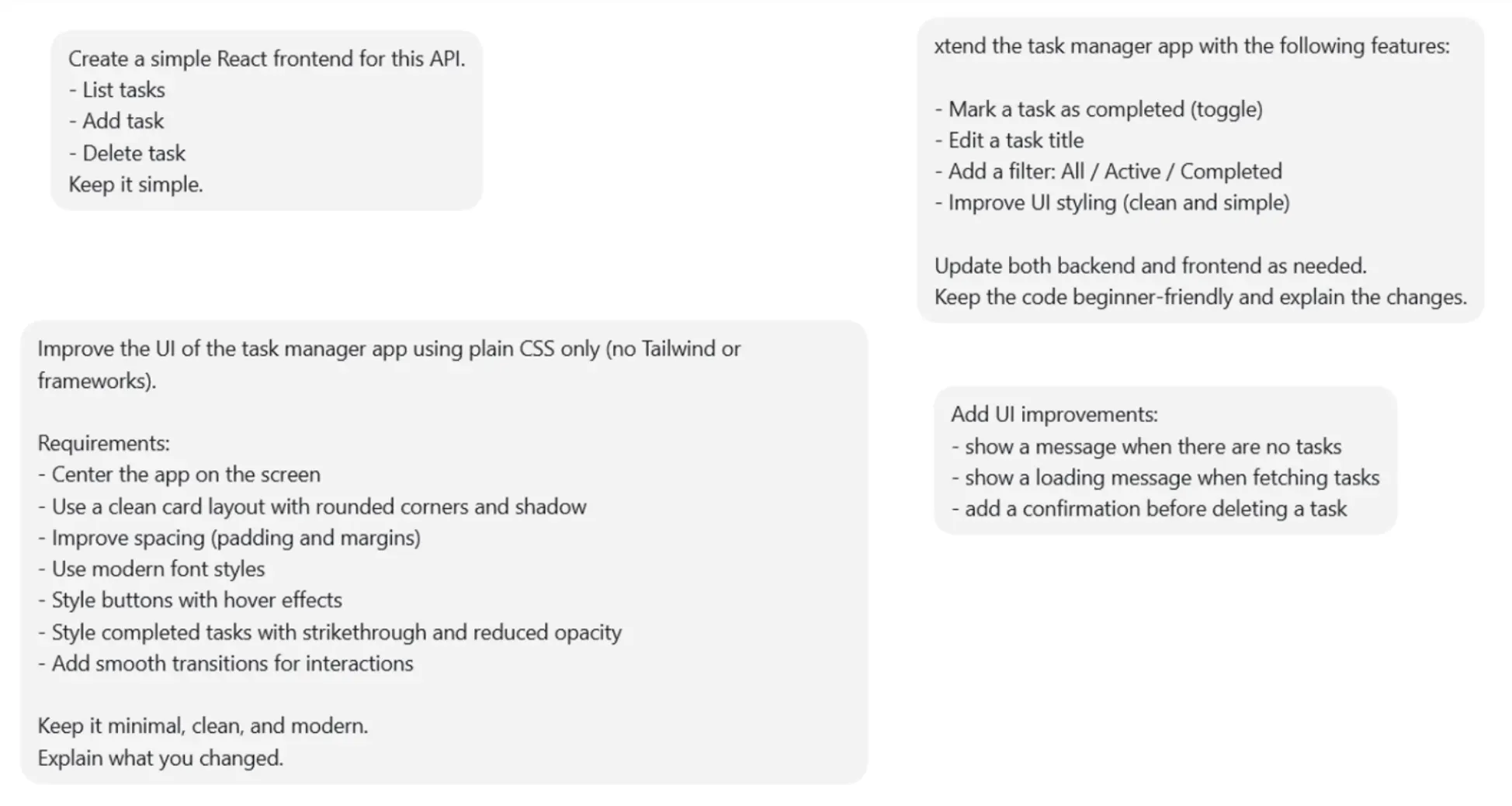
To understand how this will impact low code developers, I gave it a try with Codex and decided to do a simple test: “create a simple task manager app”. With the help of copilot, I started to talk with Codex about my app. As mentioned, I had to set up things that I (as a low coder) don’t usually have to worry about, these are my first messages:

I could follow the purpose of what I was doing, but I couldn’t understand “use express”, “enable JSON middleware”… Only when we started talking about UI did I become more comfortable with what I was doing:
Less than one hour after I started this was the outcome:
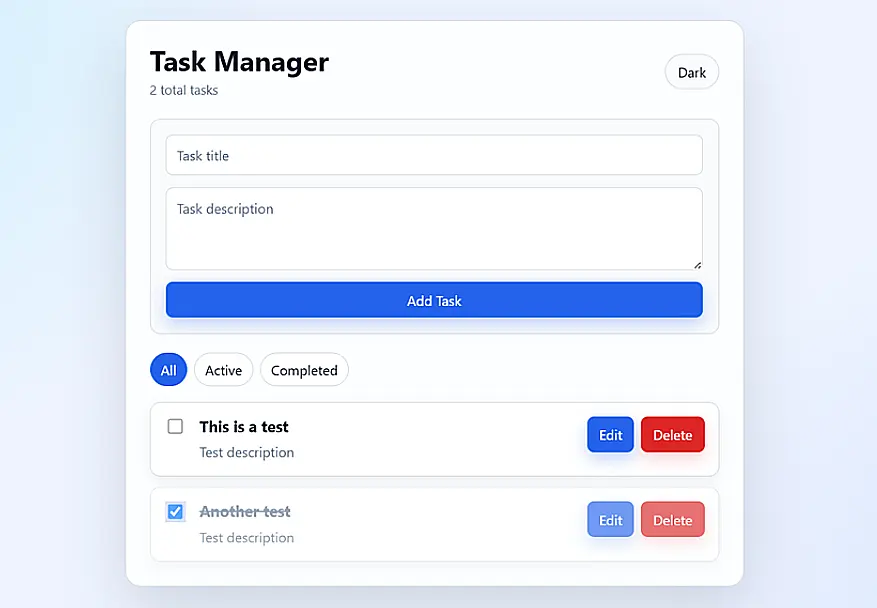
I was amazed! It worked and it looked really good, without a lot of instructions. Now the question was: could I do the same in OutSystems? How would these two worlds combine?
In OutSystems, vibe coding can be done using Mentor Studio – it has been a work in progress – it can now be used inside ODC Studio. With Mentor Studio, the conversation was way more simple. With just a few instructions, Mentor Studio had generated a simple task manager – although with the very typical OS UI.
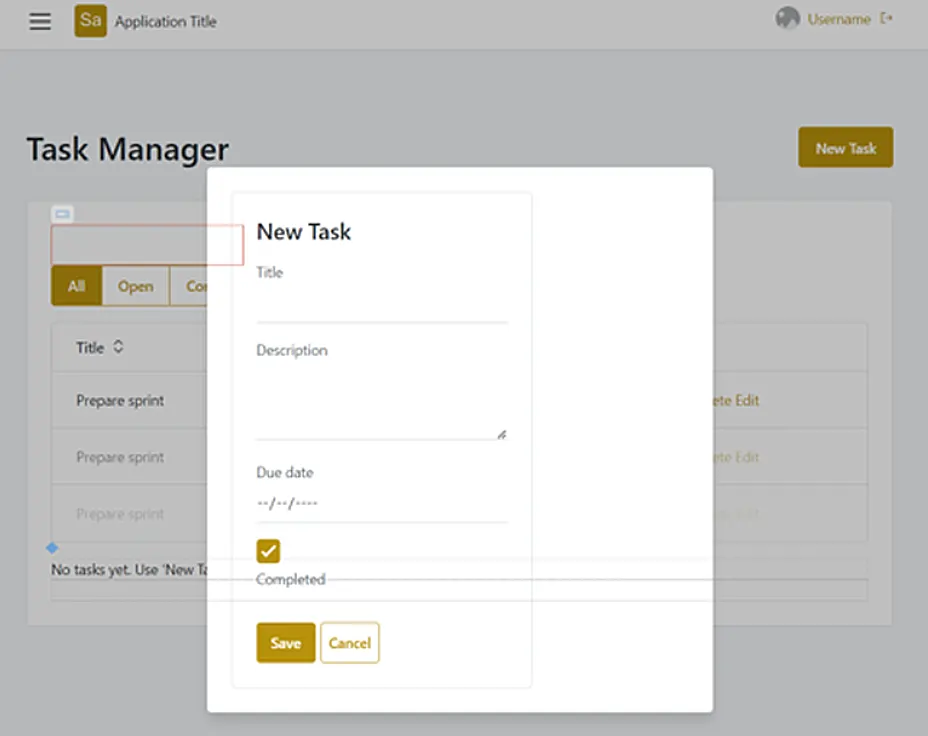
Then, I also asked it to improve the UI. And that was when I was convinced that Mentor Studio is ready for the competition:
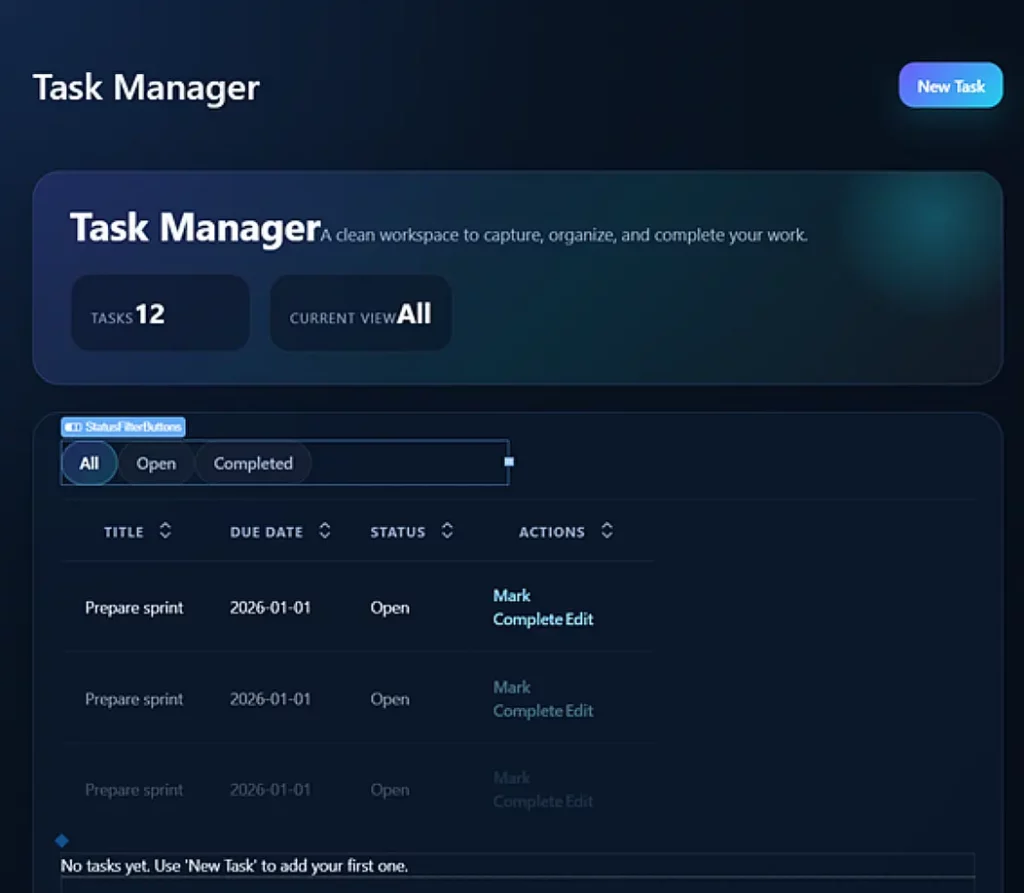
It still needed some tweaks to be perfect, but my goal was only to understand if Mentor Studio is ready or not.
When you ask Mentor Studio something, the activity can be performed across the interface, logic or database – it has that ability. More importantly, it allows you to see where the changes happened and, if needed, you can use the version comparison to pin-point every change by double clicking “View changes” on your latest Mentor Studio conversation.
If you think beyond generating code, you can also generate your documentation or have it explain the code to you.
In case you missed it: very soon Claude Code, Cursor, Codex, Kiro… can be connected to OutSystems and you can develop visually and with AI (best of both worlds 🤯).
But the thing about using such tools or LLMs… is that you need to have subscriptions which have a tier of usage. So, you need to keep an eye on your token usage, because the cost can really go up. Whereas with Mentor Studio you have your OutSystems licence and this is just one more tool available for you to use out-of-the-box.
One of the best things about using Mentor Studio is that you have the perfect combination of writing code very fast and seeing what you are writing with ODC Studio. The best of both worlds!
On my Codex test I never saw a line of the code generated. If I had run out of credits and had to fix something, I wouldn’t have been able to. Looking forward to play with Codex connected to OutSystems though.
Vibe coding: to production in 2 days
Fortunately, a new challenge came up within CoolProfs: create a soccer world cup app for our colleagues. We thought of this only two days before the start of the tournament.
First things first: how will it look?! As we saw before, the Mentor Studio starting point is constrained by the OutSystems UI. For this app, we wanted to design mock-ups that looked amazing. Thus, for the design of the app we vibe coded with Figma Make – also an AI agent – to generate mock-ups of our app. Figma itself is one of the most used interface design platforms and using its AI agent is taking advantage of all the years of experience in designing products. When we asked it to generate mock-ups for a world cup fantasy league the result was spot on. FYI, this is a paid product for which we happen to have a subscription.
Unfortunately, Mentor Studio in ODC Studio, as well as our internal AI tool Microsoft Copilot, cannot read Figma designs (at least for now). So, we gave the HTML to Copilot and asked it to translate in a way that Mentor Studio would understand. Using Copilot as an intermediary, we built the foundation of the UI on ODC Studio and, in less than a day, we were ready to show the app to internal stakeholders. Maybe we didn’t need Copilot, but I didn’t want to risk and overwhelm Mentor Studio.
Now, how will we keep the results up to date? Since we are developers… let’s automate it! We found a free API and gave the specs to Mentor Studio, it did the integration on its own – hats off to Mentor Studio on that one.
Now that we had the UI figured out and where our data was coming from, the second day was spent implementing new features that the stakeholders requested (dark theme booo), building the workflow to automatically update the matches information, fix any issues identified in the code quality tool of ODC and testing. This is the outcome:
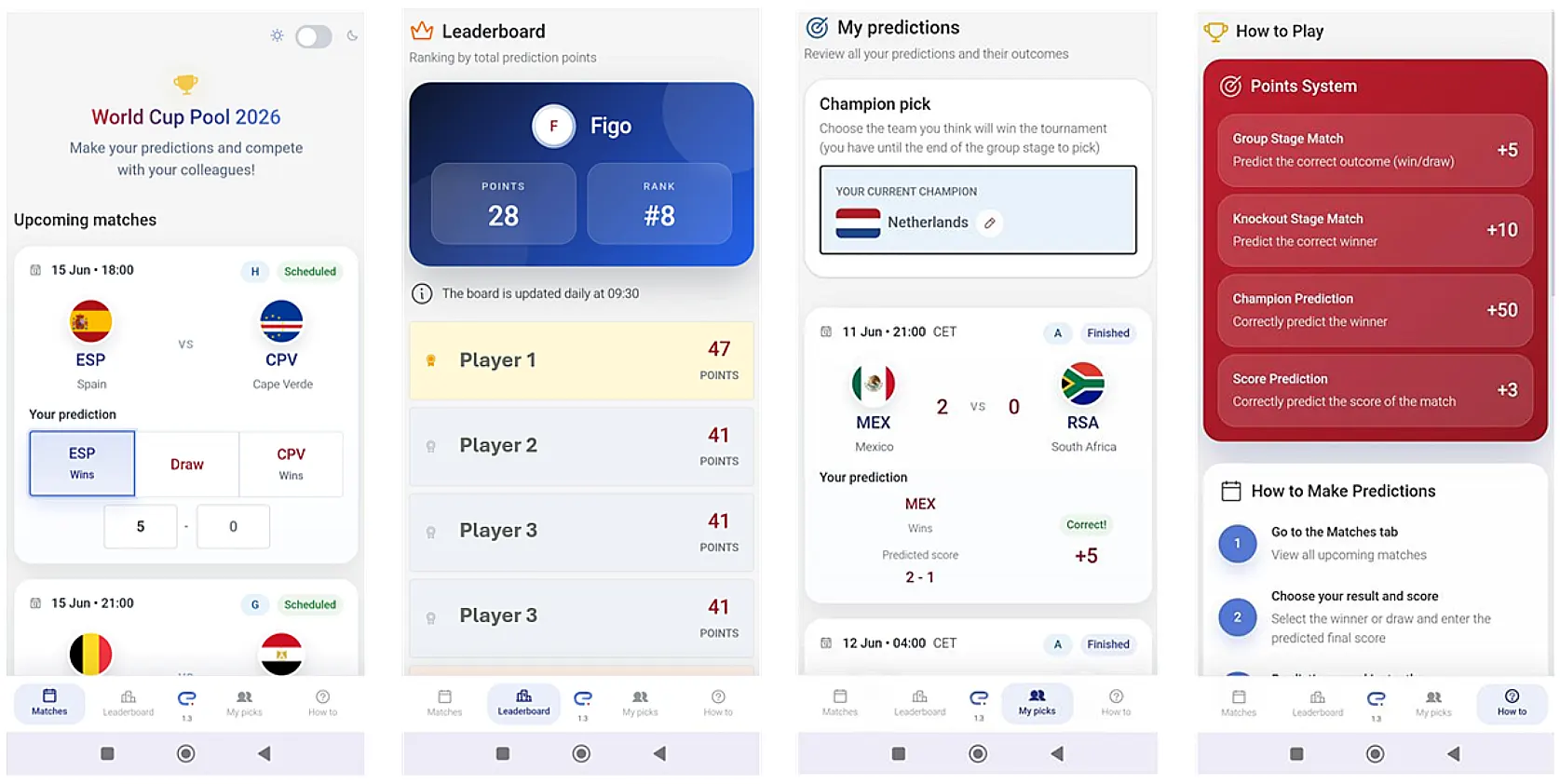
In my opinion, I think Mentor Studio is ready for you to start developing with it – let it do 80% of the work and just review it and finish it off. There are already companies working with a Mentor-first approach and they are having interesting results. We, at CoolProfs, will also start using this approach.
However, if we look at the full picture, app development is not just about the code, it also encompasses security, compliance, governance, operations, logs… Working with OutSystems, we developed this in 2 days and within a couple of minutes our app was deployed and live in production – fully governed. A fully manual development cycle using OutSystems low-code would probably take 2-4 weeks.
It feels really good to develop this quickly and get an amazing UI. Of course there were small bugs. In some cases, we gave Mentor Studio the feedback that we got from the users and told it to fix it: sometimes it worked, sometimes it didn’t. But it would be easy to fix manually. All-in-all, it was just 2 days to have this looking amazing and live in production, with additional features asked on day one.
Mentor Studio is a work in progress
I know that I have been saying only amazing things… and it is true, Mentor Studio is amazing. As always, there is still room for improvement: it could be me not giving the full instructions, but I wanted to see what Mentor Studio would do without much detail. For me:
- it uses too much hardcoded text checks and does not take advantage of static entity identifiers;
- the CSS generated is not human readable;
- the logic flows generated are not the tidiest ones (I like to see organized code);
- and sometimes it creates duplicated stuff on screen.
But these are things that very likely are easily fixed and also… that is why the developer is there. We still need humans. It will always be a human that is accountable for what goes live. After all, you can’t hold a machine accountable.
My advice:
- work on your critical thinking and architecture skills.
- You need to have the right knowledge to be able to understand and review what the AI suggests or does for you;
- build things feature per feature, remember AI is dumb if you ask too much of it at the same time;
- test, test, test… and, oh, test! This is always important, regardless of how you code.
If you follow the advice, you should be able to have more time to understand the business requirements and to be sure you know exactly what you are building. As OutSystems’ Sezen de Bruijn nicely put it: we are moving “from code writer to AI conductor”.
You are on time
You haven’t started working with AI yet? That’s okay, you can jump straight into vibe coding. OutSystems is also learning and keeping up with the speed of change… that is why they have renamed themselves to an Agentic Systems Platform. CoolProfs is also keeping up with AI and all the other stuff. Did you know we built a free tool to help you govern your AI agents?
This article was human generated by Clarisse Carneiro, Consultant, CoolProfs